Showing posts with label myDatavo. Show all posts

Wednesday, May 1, 2013

myDatavo Mobile - Unified Communications on the Go


Now that you have learned a little about our myDatavo product, we want to tell you more about our amazing mobile app that will help your business meet your communication needs head on. 

myDatavo Mobile allows your work phone or portable device to operate in succession with each other. Your business telephone does not have to be tied down to a physical device or location, allowing for you to have complete control over where, when and how you are reached. 

When you have myDatavo Mobile running, any of your devices with the same phone number will assume the features, dialing plans, and outgoing caller ID of their paired couterpart - by far surpassing the functionality of Find-Me-Follow-Me or Sim-Ring.

No matter what type of device you are using - PC, tablet, or mobile phone, you can seamlessly push or pull a call between them without the person on the other end of the phone having the slightest idea.

myDatavo Mobile includes video calling that can be used over your cellular network or Wi-Fi and is available on the iTunes App Store for Apple devices and Google Play for Android devices. 

Features include:
  • Seamless handover from cellular to Wi-Fi
  • Multi-personailty mobile & PC pairing
  • High definition voice & video calling
  • Fluid multi-screen in-call control
  • Superior call quality

For more information on myDatavo please contact Datavo at 888.532.8286. 

Sunday, April 28, 2013

7 Reasons to Choose Datavo's Hosted Phone Solution - myDatavo


There are many reasons to choose Datavo's Hosted Phone Solution - myDatavo, but we think the following are the top 7 reasons why.

1. Calls are cheaper - No matter what type of business you run, call costs for on Datavo's Hosted Phone Solution will be significantly cheaper than with an analog telephone line.

2. Phone equipment is cheaper - The only thing necessary to purchase when using our hosted phone solution are VoIP phones, and an internet connection (which we can provide to you as well). This allows business to bypass the large costs associated with purchasing an onsite phone system. We will provide you with an interface to make any changes via your internet connection.

3. Easy to add additional services - If you need to add an additional line all that you need to do is purchase a new VoIP phone, call us for an additional line and plug in the phone.

4. Less maintenance - Any IT support, maintenance or upgrades are handled by us here at Datavo, allowing you to cut costs with your employees. Also if you choose to add an auto-attendant you will not longer need a receptionist.

5. Easy to unify your communications - We make is simple for you to unify your communications by combing your contacts and Voicemails all in one easy to use interface.

6. Perfect for telecommuters - With our call jump feature and mobile smartphone apps, you can now take your work telephone line with you wherever you go on your Andriod or iPhone.

7. Provides innovative features - Auto Attendant, myDatavo Assitant, Call Manager, Visual Voicemail, Call Jump, Phone Remote, Music on Hold and Voicemail Fusion are just a few of the available features available to myDatavo customers.

For more information on myDatavo, visit our website www.datavo.com or contact us at 1.877.7DATAVO.

Saturday, April 20, 2013

myDatavo Widgets


myDatavo delivers a variety of high-function, portable mini-applications, known as Widgets, which include:

• Voicemail – Message lists, with text transcripts, playback and management (including automatic notification when new messages arrive) 
• Call Lists – All recent call information 
• Dialer – Click-to-Dial, either from a voicemail or call record, or just to a contact in your    myDatavo contact list 
• Conference – integrated conference control to provide real time control over conference calls 

These enable some of the most valuable myDatavo features directly from your homepage or desktop. Access to myDatavo features are seamlessly integrated and Widgets are available for the following environments: 

• Chrome 4 and 5, and Safari 5 and Firefox 3 on a Mac 
• Windows 7 and Windows Vista Sidebar, 32-bit and 64-bit versions 
• Mac OS X Dashboard, Leopard or later version 
• Google homepage 
• Gmail 
• Google Calendar 

Widgets also provide a quick-launch button to open full myDatavo, bypassing the login screen.

For more information please contact Datavo at 1.877.7DATAVO or www.datavo.com

Monday, April 8, 2013

Understanding myDatavo's Multiple Appearance Directory Number (MADN)


Do you wish you have control over how and where your telephone line rings? If so, a Multiple Appearance Directory Number from myDatavo is what you need.

A Multiple Appearance Directory Number (MADN) allows an incoming call to ring at multiple locations simultaneously. All devices where MADN is shared can be used to answer an incoming call or originate a call on behalf of the main location, such as in an administrative assistant/executive scenario for instance.

Functionality:

An MADN allows your devices to share the same line appearance, so that these locations all behave as extensions of a single line/user.

One of the locations will be allocated as the primary location while the other locations are called alternate locations. Any type of device can be used for primary and alternate locations.

When a user is idle, an incoming call alerts all the assigned locations. The first location to pick up the call is considered the active location and the others are released.

If one of the users is already busy on a call on one of the locations associated with the MADN, the incoming call will ring only at the active location.

Control:

With the myDatavo web portal you can enable or disable your individual alternate locations through the settings on your own without having to contact your phone company and place an order. Disabling a location will not stop the functionality and only removes the call notifications from that user.
As an administrator you will also have the ability to control if or when your calls are allowed to originate from your alternate locations. 

Feel free to contact Datavo at 1.877.7.DATAVO for more information on MADN's.

Saturday, April 6, 2013

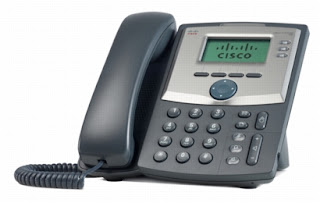
Overview of the Cisco SPA303 3-Line IP Phone

The Cisco SPA303 IP Phone is a feature rich VoIP phone that administers voice communication over an IP network that is fully functional with myDatavo. This model phone includes traditional features, such as redial, transferring calls, call forwarding, conference calling, speed dialing, and access to your voicemail. Calls can be handled through the handset, headset or over the speaker option.


IP Phones include specialized features that are not available on traditional phones. The SPA303 phone has an Ethernet port that allows it to be connected directly to the internet and linked to your computer network. It also included an additional port so that your computer can be connected to the network through the IP phone.

Included Features:
• Three voice lines
• Pixel-based display: 128 x 64 monochrome graphical liquid crystal display (LCD)
• Line status: active line indication, name and number
• Menu-driven user interface
• Shared line appearance*
• Speakerphone
• Call hold
• Music on hold*
• Call waiting
• Caller ID name and number
• Outbound caller ID blocking
• Call transfer: attended and blind
• Three-way call conferencing with local mixing
• Multiparty conferencing via external conference bridge
• Automatic redial of last calling and last called numbers
• On-hook dialing
• Call pickup: selective and group*
• Call park and unpark*
• Call swap
• Call back on busy**
• Call blocking: anonymous and selective
• Call forwarding: unconditional, no answer, and on busy
• Hot line and warm line automatic calling
• Call logs (60 entries each): made, answered, and missed calls
• Redial from call logs
• Personal directory with auto-dial (100 entries)
• Do not disturb
• Digits dialed with number auto-completion
• Anonymous caller blocking
• Support for Uniform Resource Identifier (URI) (IP) dialing (vanity numbers)
• On-hook default audio configuration (speakerphone and headset)
• Multiple ring tones with selectable ring tone per line
• Called number with directory name matching
• Ability to call number using name: directory matching or via caller ID
• Subsequent incoming calls show calling name and number
• Date and time with support for intelligent daylight savings
• Call duration and start time stored in call logs
• Call timer
• Name and identity (text) displayed at startup
• Distinctive ringing based on calling and called number
• 10 user-downloadable ring tones
• Speed dialing, eight entries
• Configurable dial/numbering plan support
• Intercom*
• Group paging
• Network Address Translation (NAT) traversal, including Serial Tunnel (STUN) support
• DNS SRV and multiple A records for proxy lookup and proxy redundancy
• Syslog, debug, report generation, and event logging
• Support for highly secure encrypted voice communications
• Built-in web server for administration and configuration with multiple security levels
• Automated remote provisioning, multiple methods; up to 256 bit encryption (HTTP, HTTPS, Trivial File Transfer Protocol [TFTP])
• Option to require administrator password to reset unit to factory defaults

*Feature requires support by call server.
**Feature activated via feature code.

For more information please contact Datavo at 1-877-7-DATAVO.

myDatavo Assistant

The Datavo myDatavo Assistant is a lightweight application toolbar, designed to complement your myDatavo Web Portal. It offers automatic notifications and instant access to regularly used calling features making it a valuable tool for keeping your users connected.


HIGH FUNCTION TOOLBAR

myDatavo Assistant significantly enhances the user experience by enabling your users to access communication services at any time from their desktop. Subscribers can now access their most advanced telephony services from their computers, without having to change applications. 

An intuitive toolbar application, it allows your subscribers to:

• search their myDatavo contact list
• initiate and configure synchronization with Outlook contacts
• search contacts in an external LDAP directory
• initiate click-to-dial outgoing calls
• enable/disable key call services.

This integrated approach even provides extensions that allow your subscribers to initiate click-to-dial outgoing calls directly from Microsoft Outlook.

INTEGRATED NOTIFIER

The myDatavo Assistant Notifier transparently maintains contact with myDatavo Web Portal so that it can alert subscribers whenever calls are incoming, or when a new voicemail is received, via a pop-up notification. The notification displays the name of the caller (pulled automatically from the user’s myDatavo contact lists), their number and the time of the message. In addition, when a user receives an incoming call, the notifier provides options to send the call to voicemail or forward it to another line, at the click of a button. Residing in the Windows system tray, it offers a notification area icon that shows voicemail status and provides a shortcut to myDatavo.

IMMEDIATE STATUS CHANGES

myDatavo Assistant allows users to easily change their status in much the same way they’re already used to doing through their instant message clients. A simple point and click allows users to select:

• Ring my phone – deactivates any other service that might be in effect
• Do not disturb – activates the Do Not Disturb (DND) feature
• Forward calls – to the previous five numbers used for forwarding or to a different number they can input
• Find Me Follow Me – delivers granular control over advanced call routing functionality.

Feel free to contact us at 1.877.7.DATAVO or www.datavo.com for more info.

Friday, April 5, 2013

Smartbiz - A myDatavo Hosted Phone Solution


myDatavo Smartbiz is a VoIP, cloud based, fully featured phone system that lets you manage extensions, view voicemail, faxes and handle inbound or outbound calls to your business lines from the web, through free mobile apps and Windows software. 

With the click of a few buttons you can manipulate call handling rules from anywhere in the world by accessing Datavo’s easy to use portal. Our web portal mobile apps not only give you complete control over your business extensions but convert your team’s smartphones and tablets into a fully featured desk phones; therefore, when your desk line rings, your devices with myDatavo mobile installed will ring at the same time.

With myDatavo SmartBiz you only need a high-speed internet connection and everyone at your business is making calls in no time. Unlike old systems, myDatavo Smartbiz does not have any expensive, bulky hardware and can be set up online in minutes. Your Datavo phones will be sent directly to your office and will arrive Datavo Ring Ready® so there’s no time wasted.

Ultimately, myDatavo SmartBiz delivers the features and services you require to communicate efficiently with customers and colleagues no matter where you are.


Included Features:

  • Administration Web Portal
  • myDatavo Mobile for iOS and Android
  • myDatavo Assistant Toolbar
  • myDatavo Communicator Softphone
  • Easy Phone Manager
  • Easy Call Manager
  • Music on Hold
  • Visual Voicemail with VM to Email
  • Phone Remote
  • Unified Contacts
  • Voice Mail Fusion
  • Call Jump
  • Cisco 3 line phone per Extension
  • Unlimited local, station-to-station or on-net calling

Premium Options:

  • MPLS dedicated T1 Access
  • Unlimited Additional Users
  • Easy or Premium Auto Attendant
  • Unified Fax Messaging
  • Incoming Call Manager
  • Voicemail Speech to Text
  • HD Conferencing
  • Installation Services Available

Wednesday, April 3, 2013

myDatavo Visual Voicemail


myDatavo Visual Voicemail allows you to see a list of the messages in your Voicemail box and choose which of them you want to play or delete, in whatever order you select, right from the your myDatavo Voicemail tab . Visual Voicemail lists your voice mail messages by date and time and also displays relevant information like caller name & callback number.

Visual Voicemail comes free with your myDatavo service and allows you to:
  • Listen to your messages in any order you want.
  • Swiftly get to your most important messages first.
  • Save numbers directly to your contacts list.
  • Has an option to receive and email alert when a message is received.
  • Instantly call the person back with the click of a button.

Sunday, March 31, 2013

The Advantages of myDatavo Call Jump


Have you ever taken a work call on your cell phone from a customer and wished that you could transfer the call to your work phone?

If so, Call Jump is the feature for you. It allows you to transport a call from device to device and location to location seamlessly without any interruption to your conversation.

It allows you to take a call from your home phone, switch to your mobile on your ride to work, and then switch to your desk phone when you arrive at work without the person on the line knowing anything at all.

This feature makes it where you have better reception, greater comfort and total control over your phone calls from all of your providers.

Let Datavo make your life easier with our myDatavo products. For more info contact us at 888.532.8286.

Thursday, March 28, 2013

myDatavo - Your Hosted Phone Solution


In this era of the Internet, a lot more workers are telecommuting or working on the go. With technology increasing at such a rapid rate, it's necessary for businesses of all sizes to stay ahead of the curve.  One way for this is myDatavo*. It is a fully hosted phone solution that will revolutionize the way you are able to control and unify your communications.

myDatavo allows you to keep your current numbers and is an added set of services that will enhance your telephone lines. It will integrate your desk phone, cell phone, and computer/laptops/tablet together. The myDatavo Mobile app is available for Apple devices on the Apple App Store and Android devices on Google Play.

The features that come with myDatavo are:
  • myDatavo Assistant - makes accessing myDatavo on your computer with a simple toolbar
  • myDatavo Communicator - allows you to make phone calls directly from your computer
  • Easy Call Manager - allows you to control where and when your lines are forwarded
  • Phone Remote - allows your to initiate a call on your desk phone from your cell phone
  • Visual Voicemail with Email Forwarding - screen showing your voicemail with an option to get an email alert as well.
  • Unified Contacts - allows you to import your contacts and have them all in one place.
  • Voicemail Fusion - unifies your voicemail boxes
  • myDatavo Mobile - mobile app for up to three devices (iPhone, iPad, and Android supported)
  • Call Jump - allows you to seamlessly move a call from one device to another.
*A data connection is required to use the myDatavo phone solution.

For more info on this service contact Datavo at 888.532.8286.

Friday, March 22, 2013

Understanding Cloud

Cloud Computing can be seen as the next step in the evolution of the Internet by supplying a method that everything - such as applications, computing infrastructure, computing power, business processes and personal collaborations - is available to you as a service when and where you need it.

The definition of "cloud" in cloud computing can be described as the set of hardware, storage, services, networks, and interfaces that join together to supply aspects of computing as a service. Cloud services incorporate data storage over the Internet, infrastructure, and delivery of software based on end user demand. 

There are four vital aspects of cloud computing:

1. Flexibility and the capacity for scaling up and down.
2. Application Programming Interfaces (APIs)
3. Self-support provisioning and mechanized deprovisioning.
4. A pay-as-you-go model for billing and metering of service usage.

Cloud computing is available in multiple forms such as; private clouds, public clouds, and a combination of the two - called a hybrid.

People that use cloud computing services are:
  • Cloud service providers who manage IT assets and maintenance.
  • Business executives who must be accountable for the management of their services and data being stored on the cloud. Cloud providers must make sure their networks are stable and secure.
  • Personal users that are not aware of the behind the scenes technology in place.
Businesses that use cloud computing have found that it can eradicate a large amount of complicated obstacles that traditional computing comes with, including time, space, cost and power - completely changing the way they are using technology to service their clients. But, there is a down side if the company you choose does not have proper security or their servers go down. It may be best to use cloud only as a back-up for redundancy.

Wednesday, February 20, 2013

Applications On myDatavo

With myDatavo there are a number of different applications that you can install on your mobile phone or computer so that all of you devices work together using a single system that is practical, convenient and easy to use. Here is a review a them.


Computer
  • myDatavo Assistant - provides access to contacts, voicemails and configuration of call services from your desktop.
  • Dialer - allows you to make calls from a  third-party environment.
  • Voicemail - allows you to manage your voice message from a  third-party environment.
  • Call Lists - allows you to see a list of your call log. All recently dialed, received, and missed calls.
  • Conference - allows you to set up and manage conference calls from a  third-party environment .
  • QuickDial Accelerator - allows you to make a call from Internet Explorer 8 or above or by highlighting a phone number on a web page.
  • myDatavo Communicator - allows you to make and receive voice and video calls, manage your contacts with Microsoft Outlook integration, view presence information for your contacts, access your voicemails all from your desktop.
Mobile
  • Conference - allows you to set up and manage conference calls using your mobile phone.

For more information contact us at Datavo.

Sunday, February 17, 2013

Your myDatavo Dashboard

The myDatavo Dashboard is a part of your myDatavo User Web Portal and allows you to quickly access the following key features all in one place.

  • Messages: At a glance it shows you how many new message you currently have, and your total number of messages.

  • Missed Calls: Shows all of your recent missed calls. If the calls are from a person in your contact list, their name will display along with their phone type. Clicking on the callers name will jump you directly to their contact list entry.

  • Contacts: Provides and easy way to look up your contacts by name and view the details. 

  • Call Manager Settings: Shows how your incoming calls are handled. You are able to set these settings to your liking. 

  • Click to Dial: You can place a call to any number on this screen just by clicking on it including any numbers that where recognized by your contact list and are displayed by name.

For more information contact us at Datavo.